Plan Year Close
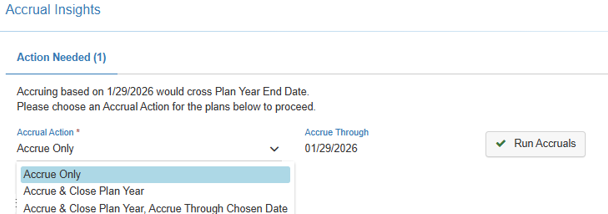
Use the Plan Year Close process to close the year for Employees’ Attendance Plans. The Accrual Action options for a Plan Year Close are "Accrue Only", "Accrue & Close Plan Year", and "Accrue & Close Plan Year, Accrue Through Chosen Date".
-
Plan Year Close
As part of the Plan Year Close, the plan details are updated with calculated year-to-date time accrued through the end of the accrual year, the previous year carryover according to how you set up each attendance plan, year-end eligibility for the new accrual year, resets to zero time taken, time accrued through last close, and time accrued since last close. The amounts and dates in the Attendance Plan Details section are updated accordingly.-
Accrue Only
Selecting the Accrual Action 'Accrue Only' will update the plan details with calculated year-to-date time accrued through the end of the accrual year without closing the current Plan Year. -
Accrue & Close Plan Year
Selecting the Accrual Action 'Accrue & Close Plan Year' will update the plan details with calculated year-to-date time accrued through the end of the accrual year, the previous year carryover according to how you set up each attendance plan, year-end eligibility for the new accrual year, resets to zero time taken, time accrued through last close, and time accrued since last close. -
Accrue & Close Plan Year, Accrue Through Chosen Date
Selecting the Accrual Action 'Accrue & Close Plan Year, Accrue Through Chosen Date' will update the plan details with calculated year-to-date time accrued through the Chosen Date within the new plan year, the previous year carryover according to how you set up each attendance plan, year-end eligibility for the new accrual year, resets to zero time taken, time accrued through last close, and time accrued since last close.
-
-
Transactions
Before closing a plan year, be sure to review the Employees’ Transactions to confirm that all Transactions were entered and verify balances by either reviewing the Plan Details summary or running the Employee YTD Details Report (this report can also be printed to provide a record of the attendance data before the Plan Year Close. We also strongly recommend having a backup of your system before closing the plan year. Having a backup ensures the ability to revert/restore your data if any issues are encountered during this process.